GGU-FOOTING: "Page size and margins" menu item
The program uses A3 format as default. You can edit the page format in the following dialog box.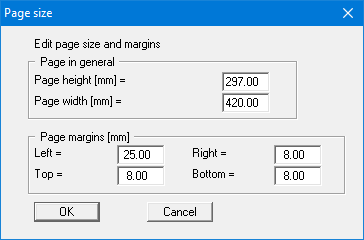
- "Page in general" defines the size of the output sheet. The program automatically draws thin cutting borders around the page, which are required when using a plotter on paper rolls. The borders can be switched off using the menu item "Graphics preferences/Margins and borders".
- "Page margin" defines the position of a frame as a distance to the margins. This frame en-closes the subsequent diagram. The margins can be switched off using the menu item "Graphics preferences/Margins and borders".