GGU-FOOTING: "Optimise footing width" menu item
This menu item is only active in the pad footing analysis mode! Alternatively, footing optimisation can also be started by pressing [F6].
If "Rectangular footing" is selected, the following dialog box opens:
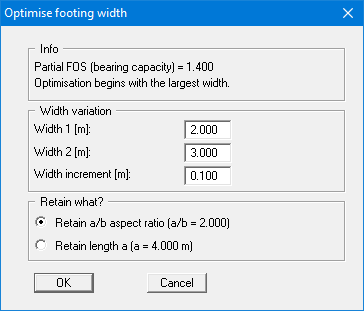
After confirming with "OK" optimisation is carried out, at the end of which you may opt to use the optimum width. A new computation is performed immediately after confirmation. If you choose not to accept the optimum width the menu item is closed.
Optimisation starts at "Width 2" and reduces the width in steps of "Width increment" down to "Width 1". It stops early as soon as, at the next smaller width, the resultant lies outside the 2nd kern or a verification is no longer satisfied. The smallest width that still meets all conditions is then offered (when stopping at the 2nd kern, from version 11.7).
The width range is preset to 2.0 to 3.0 m, regardless of the current footing width. To reduce an existing footing, enter the current width as "Width 2" and a smaller width as "Width 1".
If "Circular/annular footing" is selected, optimisation is performed for the outer circle diameter. The inner diameter is retained.