GGU-SETTLE: Operations on selected foundation
After clicking on "New" or on the button of an existing foundation, the following dialog box opens:
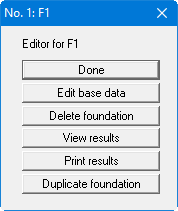
The following operations are possible:
- "Done"
You return to the original menu bar. - "Edit base data"
You can enter or edit the base data for the corresponding foundation . - "Delete foundation"
After a safety request, the current foundation can be deleted. - "View results"
The calculated settlements will be displayed. If certain settlement values have not yet been calculated, the corresponding entries will remain empty. - "Print results"
The results for the currently selected foundation will be sent to the printer. - "Duplicate foundation"
You can duplicate the current foundation. You can then edit the base data of the duplicated foundation.